To refund a player in Pickleball Tournaments (PT), open the Attendees tab, click the Menu button next to the player, select Give Refund, enter the amount, and submit. PT processes the refund for you and records it on the player's registration — never refund a player directly from your Stripe dashboard. Watch the short video below or follow the steps for full detail.
How to Issue a Refund
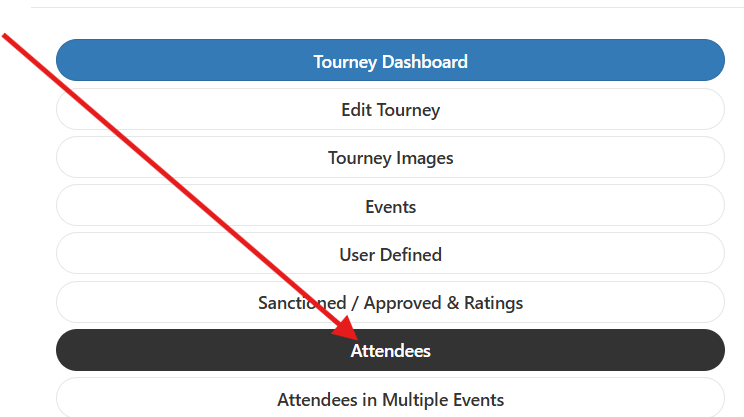
1. Open the Attendees Tab
Once logged into your tournament, head to the Attendees tab.
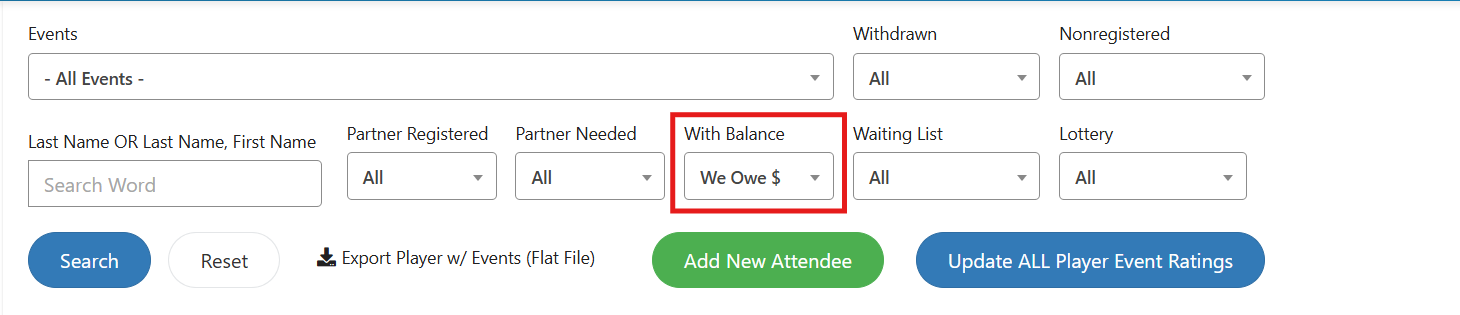
2. Find the Player
Scroll or search to locate the player you want to refund. To see all players currently listed as being owed funds, run a search filtered to that status.
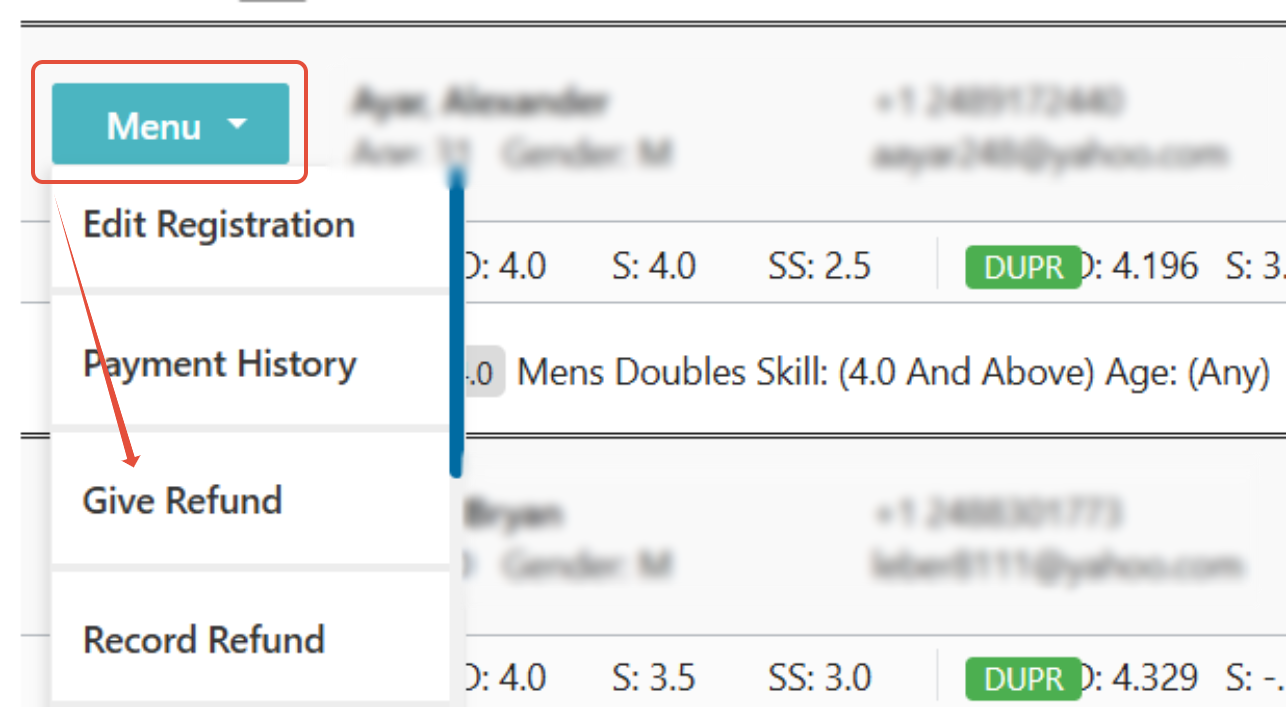
3. Open the Give Refund Option
Click the Menu button to the left of the player's name and select Give Refund from the list.
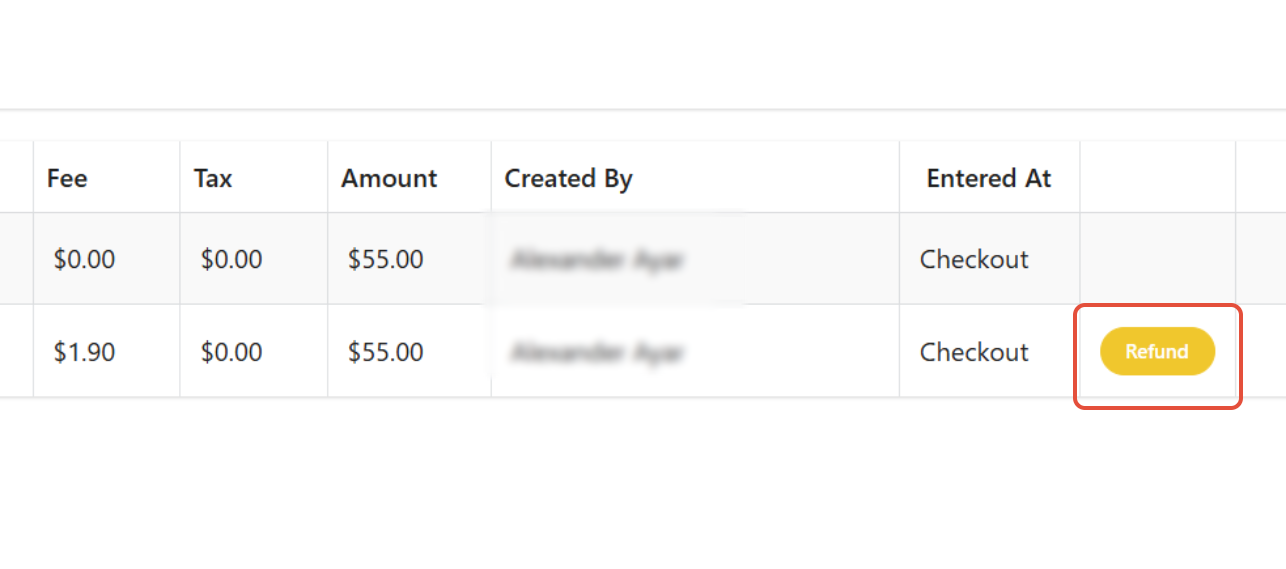
4. Click the Refund Button
Scroll to the right using the slider bar at the bottom of the page, then click the Refund button to open the refund box. You do not need to open Stripe.
5. Enter the Refund Amount
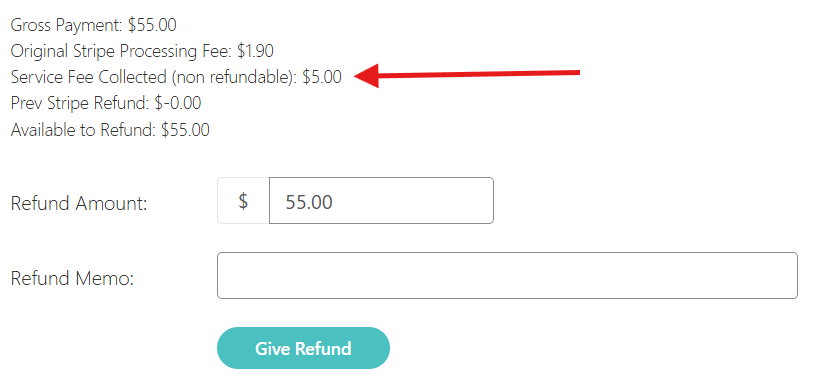
The box that appears lets you refund up to 100% of what the player paid, including the service fee and processing fee. Enter the amount and a memo, if you'd like one.
Warning
Refunds come out of your tournament's Stripe balance. You can refund the player the full amount, but Pickleball keeps its application fee (the service fee and merchant fee), so you still owe the service fee for that player even if they withdraw. The refund box labels the processing fee and service fee "non refundable." That means you keep owing them, not that you can't refund that part to the player. Decide in advance how you want to handle fees in your refund policy so players know what to expect.
6. Submit the Refund
Click Give Refund. PT processes the refund for you and records it on the player's registration. If your Stripe balance doesn't have enough available to cover it, nothing is refunded and you'll see the options in the next section.
When Your Stripe Balance Is Too Low
Stripe only allows a refund if your tournament's available balance covers it. Funds that are still pending don't count. If your balance is too low, nothing is refunded and the refund box reopens with a red message saying your Stripe account doesn't have enough available balance, plus a checkbox that lets you refund Pickleball's application fee along with the player's refund. Refunding the fee means your balance needs to cover less.
Read the red message. It shows the fee amount that will be billed to your tournament, how much you currently have available in Stripe, and the minimum you need available for this refund.
Check the box that reads Refund our application fee of $X and bill it to the tournament's Pickleball Brackets invoice. You must check it to continue.
Click Give Refund, then click Refund and bill tournament to confirm. Click Cancel to leave everything as it was.
Stripe refunds the player and also refunds Pickleball's application fee. The fee Stripe actually refunded is added to your tournament's invoice as a Refunded Fees line, split into service fee and merchant fee. Payments made in a currency other than USD are billed in USD at the original payment's exchange rate.
Note
Refunding the fee doesn't get you the service fee back. Either way, your tournament pays it. The checkbox only changes where: out of your Stripe balance now, or on your tournament invoice later.
If the red message says your balance still isn't enough even with the fee refunded, the refund was not processed. Add funds to your tournament's Stripe account and try again, or email support@pickleball.com.
Warning
Billed refunds add to what your tournament owes Pickleball. If adding the fee to your invoice would put your balance over its limit, you'll see a message that the refund can't be completed there and nothing is refunded. Email support@pickleball.com and our team will help. Large events that haven't locked yet may hit the limit sooner, because the service fee billed at lock counts toward it.
What Gets Billed to Your Tournament
What happened
What's billed to your tournament
A normal refund from your Stripe balance
Nothing. Pickleball keeps its application fee.
Your balance was too low and you refunded Pickleball's application fee
The fee Stripe refunded, as a Refunded Fees line on your invoice.
Your balance still couldn't cover the refund and Pickleball paid it for you
The full refund amount, as a Refund paid by Pickleball line on your invoice.
Lines of the same kind are combined on your invoice, with the amount shown as Varies and a breakdown underneath that lists the date and player for each one. You pay them along with the rest of your invoice. Billing applies to refunds made on or after October 13, 2026 (UTC). Earlier refunds are recorded in Payment History but aren't billed.
Registrations paid through the older checkout, and tournaments that use Pickleball as the merchant, are never billed for refunds. On an older payment, the note in the refund box says the tournament already paid the processing fees and nothing is billed back.
Why a Refund Might Be Denied for Insufficient Funds
If a refund fails or your available balance looks lower than expected, check your Stripe payout schedule before contacting support. If your Stripe account is set to Daily payouts, funds are transferred out to your bank automatically — in most cases, the balance you see in Stripe is actually marked as Future Payout, meaning it's already scheduled to be sent to your bank and is no longer available to refund, even though it still shows as a balance.
There's a second, separate reason a refund can fail for insufficient funds: our platform used to float a connected account's balance while incoming registration funds were still pending or in transit, covering refunds until those funds settled. That floating no longer happens. So even if your payout schedule isn't the issue, a refund can still be denied if funds from a recent registration haven't fully settled yet. If this happens, wait for those funds to clear before retrying, or contact support@pickleball.com for help.
For more detail, see Stripe's own guides on adding funds to your Stripe balance and how payouts to connected accounts work. Your Stripe Dashboard is only where you manage payout settings, not where you issue refunds. To change your payout schedule, go to Settings > Business settings > Bank accounts and currencies > Payout schedule in your Stripe Dashboard, where you can choose daily, weekly, monthly, or manual payouts. Switching to manual turns off automatic payouts entirely — you'll then initiate payouts yourself from the Dashboard's Payouts section or via the API.
Warning
A balance shown in your Stripe dashboard is not the same as funds available for refund. This is a setting on your Stripe account, not a limitation of Pickleball.com or PT. To avoid running into this, consider switching your Stripe payout schedule to weekly or manual, or keep a buffer in your account to cover expected refunds.
Never Refund a Player Directly Through Stripe
Always issue refunds using the Give Refund steps above, from your tournament's Attendees tab — never from your Stripe dashboard directly. Because of how Pickleball.com's checkout processes payments, a refund issued directly in Stripe does not reach the player. The funds return to Pickleball.com instead of the customer's card, and our team then has to manually forward them to the player, which adds delay.
Note
If you ever start a refund from your connected Stripe dashboard, Stripe itself shows this warning: "This will return the funds you received for this payment to your platform account, but not to the customer. If you are intending to refund a customer, initialize a refund on the original payment from the platform account's dashboard instead." If you see this message, cancel out of Stripe and use the Give Refund steps above instead — that's the "platform account's dashboard" the warning is pointing you to.
Warning
If you've already issued a refund directly through Stripe, don't try to fix it yourself. Email support@pickleball.com right away with the player's name and transaction details so our team can get the funds forwarded to them.
Frequently Asked Questions
I have a balance in Stripe, but my refund failed — why?
This can happen for two reasons. Most often, your Stripe account is set to Daily payouts, and the funds are already marked as Future Payout — already committed to your bank and no longer available to refund. Switching to weekly or manual payouts, or keeping a buffer on hand, can help you avoid this. It can also happen if funds from a recent registration are still pending or in transit and haven't fully settled yet — our platform no longer floats that gap the way it used to, so the refund gets denied until those funds clear.
Will the player be notified when I issue a refund?
Stripe sends the refund directly to the card the player used at registration. Some banks email or push-notify the cardholder when a refund posts; others only show it on the next statement. It's a good practice to send the player a quick note (email or text from the Attendees screen) letting them know the refund was issued and roughly when to expect it.
How long does it take for the refund to appear on the player's card?
Stripe typically processes refunds in 5-10 business days, depending on the player's bank or card issuer. Refunds can occasionally take longer for international cards. If a player asks about a refund that's been pending for more than 10 business days, ask them to check with their bank first — the refund is almost always on the bank's side at that point.
Can I issue a partial refund?
Yes. The refund amount field accepts any value up to the original registration total. This is useful if you're refunding for a withdrawn event but keeping the player in others, or if your refund policy returns a percentage rather than the full amount. If you refund Pickleball's application fee on a partial refund, Stripe returns a share of the fee in proportion to the refund, and the refund that completes the payment returns whatever fee is left. You're only billed for the fee Stripe actually refunded.
Do I still owe the service fee if I refund a player?
Yes. You can refund a player up to 100% of what they paid, including the service fee, but Pickleball keeps its application fee on every registration. Your tournament owes the service fee for that player even if they withdraw. A refund comes out of your Stripe balance, so make sure your refund policy is clear with players up front.
Can I refund a player after the tournament has ended?
Yes, refunds can be issued after the tournament ends as long as the original Stripe charge is still within Stripe's refund window (typically 180 days from the original transaction). If you're past that window, contact support@pickleball.com and we'll help you work out an alternative.
I accidentally refunded a player directly through Stripe — what do I do?
Email support@pickleball.com with the player's name and transaction details, and our team will get the funds forwarded to them. Going forward, always use the Give Refund option on the Attendees tab so refunds reach players automatically.
Why was my tournament billed after a refund?
Your Stripe balance was too low, so either you chose to refund Pickleball's application fee along with the refund, or Pickleball paid the refund for you. Look for a Refunded Fees or Refund paid by Pickleball line on your tournament invoice. The breakdown shows the player and date. Email support@pickleball.com if a line doesn't match a refund you made.
A refund timed out or says it's pending. Should I try again?
Check the player's Payment History first. If you see a message that PT couldn't confirm with Stripe whether the refund went through, trying again is safe: PT checks Stripe first and records a refund it finds instead of refunding twice. If a refund is marked PENDING, don't refund again. It appears in Payment History when Stripe confirms it. Two refund rows in Payment History mean two separate refunds were made, and refunds can't be reversed.