How to Find a League to Join on Pickleball.com
To find a league to join on Pickleball.com, log in, click the Leagues tab in the top navigation, and use the search and filter options to browse by name, status, location, format, and day of the week. You can also save leagues you're interested in to My Favorites for quick access later.
How to search for a league
- Log in to Pickleball.com.
- Click the Leagues tab in the top navigation bar.
- Browse the list or use the search and filter options to narrow your results.

Search and filter options
The league search screen includes several filters to help you find the right league:
| Filter | What it does |
|---|---|
| 1. Search by name | If you know the league name, type it in and click Apply |
| 2. Status | Filter by Active or Completed leagues |
| 3. Country | Filter by country |
| 4. State | Filter by state |
| 5. Player Groups | Filter by types of groups |
| 6. Formats | Filter by format type |
| 7. Day of the week | Filter by the day(s) you're available to play |
| 8. Reset | Clears all filters so you can start a new search |
| Apply | Runs the search with your current filter selections |

Saving leagues to My Favorites
If you find a league you want to come back to, you can save it as a favorite for quicker access later.
- In the league search results, find the league you want to save.
- Click the heart icon in the top right corner of the league's listing card. It will turn active to confirm it's been saved.
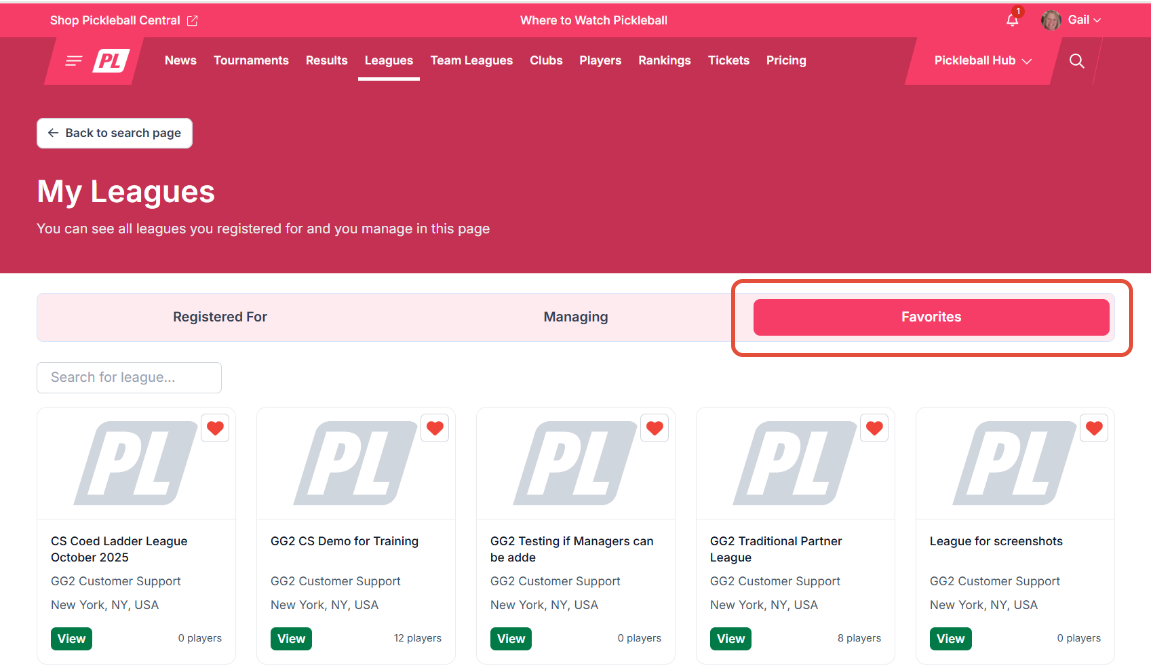
- To find your saved leagues, go to your profile and click My Leagues, then select the Favorites tab.
Frequently Asked Questions
How do I filter for only active leagues?
Use the Status filter and select Active. This will show only leagues currently accepting registrations or in active play.
My search isn't returning results — what should I do?
Use the Reset button to clear all your current filters, then start a new search with different criteria.
I found a league I want to join — what's next?
Once you've found a league you want to join, see How to Sign Up for a League on Pickleball.com for step-by-step registration and opt-in instructions.
Related Articles
- How to Sign Up for a League on Pickleball.com
- How to Find My Leagues on Pickleball.com
- Understanding Your League Schedule in PL
Questions about finding a league? Email support@pickleball.com.