Yes. You can update registration dates, player requirements, and event limits at any time before registration closes. Changes to registration open/close dates take effect immediately.
To configure registration settings for your tournament in Pickleball Tournaments (PT), go to Edit Tourney and select the Basic Info tab. Registration settings control when players can sign up, what information they must provide, and how many events they can enter.
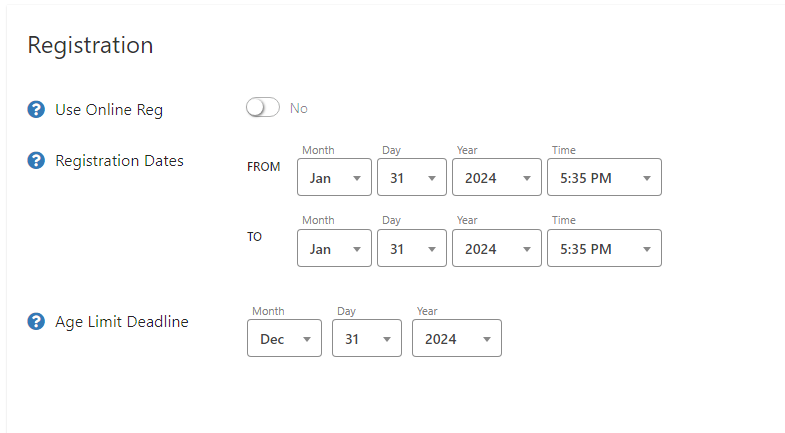
The Age Limit Deadline is the date the software uses to calculate each player's age for age-restricted events. Set this to the last day of your tournament so players are placed in the correct age division based on how old they'll be during your event — not at the end of the year.
WarningIf you leave the Age Limit Deadline at the default (December 31), players will be placed based on their age at year end, not their age during your tournament. For events with strict age divisions (50+, 55+, etc.), always update this date to your tournament's last day.
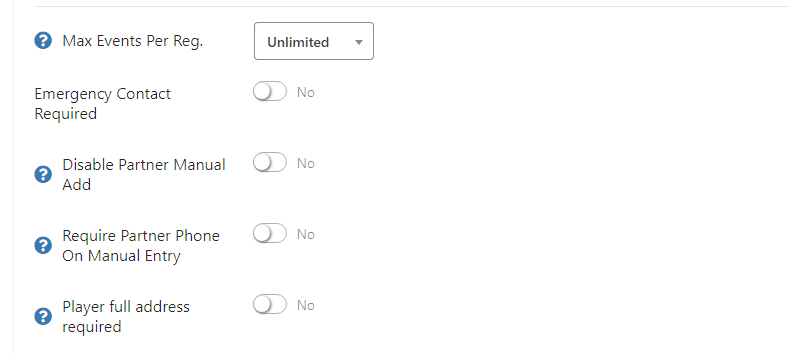
These settings determine what information players must have in their Pickleball.com profile before they can complete registration:
 Recommended
Leave Max Events Per Registration blank unless you have a specific reason to cap it. Managing capacity at the individual event level (in each event's setup) gives you more precise control.
Yes. You can update registration dates, player requirements, and event limits at any time before registration closes. Changes to registration open/close dates take effect immediately.
Set the Age Limit Deadline to the last day of your tournament. This ensures the software uses each player's age during your event, not their age at the end of the calendar year.
Enable Emergency Contact Required in the registration settings. Players without an emergency contact in their profile will receive an error message at checkout and must add one before they can complete registration.
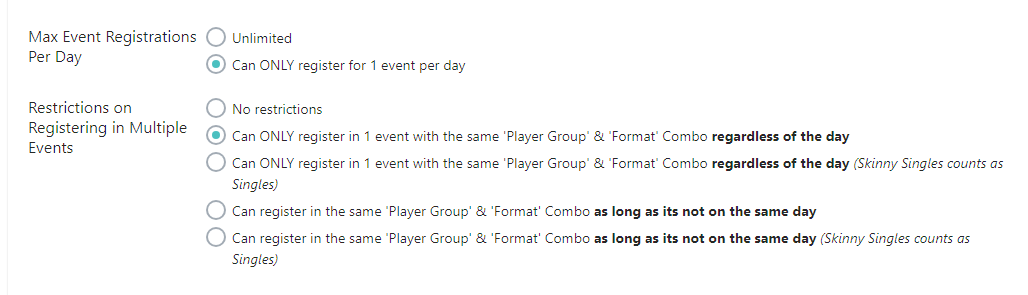
Use Max Event Registrations Per Day to limit daily entries, and use the Restrictions on Registering in Multiple Events section to control format-level restrictions. Both settings work together to manage player scheduling across multi-day events.
Yes, if the "Pay On Site" option is checked, a player can register without have to pay during the online registration/checkout process.
Need help with registration settings? Contact our support team at support@pickleball.com.