How to Find Your Managed Tournament in PT
To find a tournament you're managing in Pickleball Tournaments (PT), sign in to your Pickleball.com account, click the Tournaments tab, and use the My Tournaments filters to locate it. Watch the video below for a quick walkthrough, or follow the step-by-step instructions for full detail.
Before You Begin
- You must be signed in to your Pickleball.com account.
- You must be listed as a manager or director on the tournament in PT. If the tournament doesn't appear in your Managing filter, you're not listed as a manager — contact the tournament owner to be added.
Step-by-step
1. Open the Tournaments tab
After signing in to your Pickleball.com account, click the Tournaments tab.
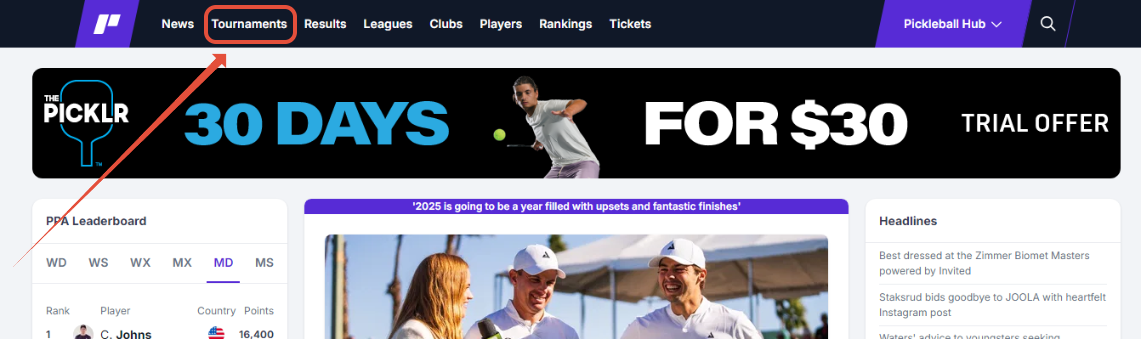
The Tournaments tab redirects you to Pickleballtournaments.com, where all PT tournament registrations and management live.
2. Click My Tournaments
Click the My Tournaments tab to see tournaments you're managing or registered for.
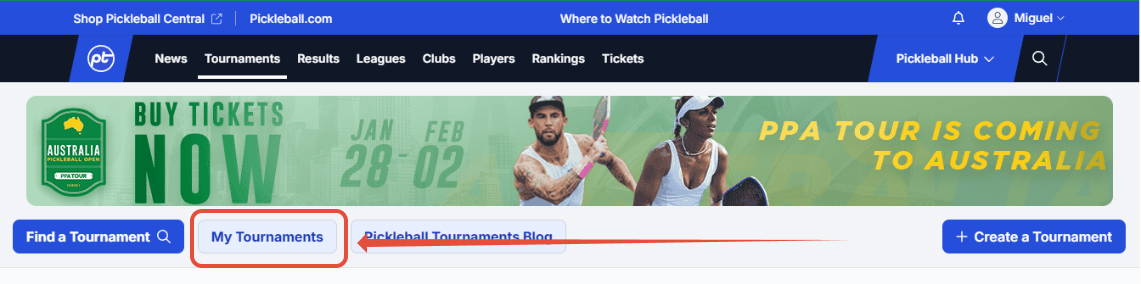
From here you can browse tournaments where you're a player (Registered for) and tournaments you're managing (Managing).
3. Use the search filters
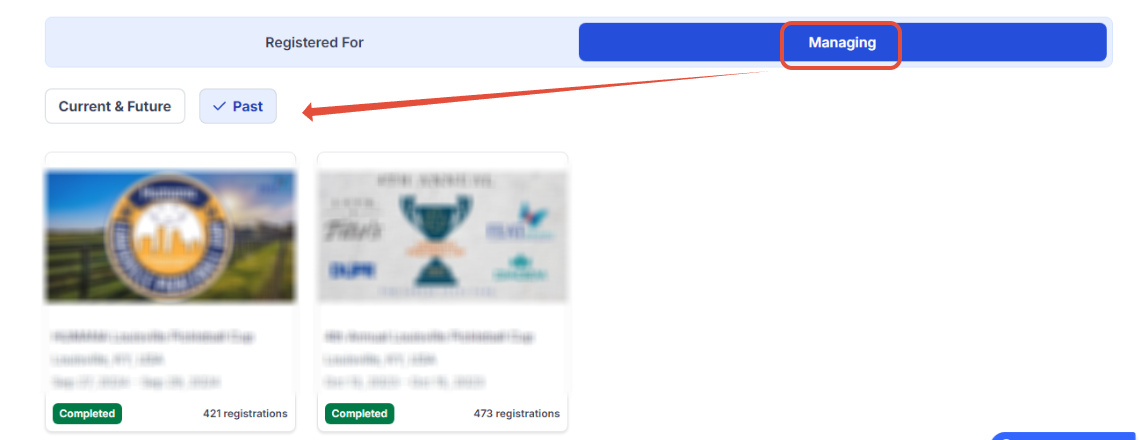
Use the search filters to switch between past and upcoming tournaments.

4. Pick your filter combination
Choose your filter combination (for example, past tournaments you managed) and the matching tournaments will appear.
5. Open the management dashboard
Click the tournament you want to access. On the tournament detail page, click Manage Tournament to enter the management dashboard.
 Note
NoteIf you don't see your tournament in the Managing list, make sure your filters are set correctly — check both the time range (past vs. upcoming) and role (Managing vs. Registered for). If the tournament still doesn't appear, you may not be listed as a manager on it. Contact the tournament owner or reach out to support@pickleball.com.
Frequently Asked Questions
Why am I redirected when I click Tournaments?
PT tournament registration and management is hosted at Pickleballtournaments.com. The Tournaments tab on Pickleball.com sends you there automatically once you're signed in.
Why don't I see my tournament in My Tournaments?
Make sure your filters cover the right time range (past vs. upcoming) and the right role (Managing vs. Registered for). If the tournament still doesn't appear, you may not be listed as a manager on it — contact the tournament owner or email support@pickleball.com.
What's the difference between Managing and Registered for?
Managing shows tournaments where you're listed as a tournament director or manager — you have access to the management dashboard for those events. Registered for shows tournaments where you signed up as a player. The same account can appear in both lists for different tournaments.
How do I get to the management dashboard?
Click the tournament from your My Tournaments list, then click Manage Tournament on the tournament detail page. This takes you directly into the PT management dashboard for that event.
Can one account manage multiple tournaments?
Yes. Every tournament where you're listed as a manager will appear in the Managing filter, and you can switch between them by returning to your My Tournaments list. There's no limit to how many tournaments one account can manage.
Related Resources
- Tournament Pricing — what it costs to run a tournament on PT
- Understanding Your Tournament Dashboard — a breakdown of every dashboard section
- How and When a Tournament Is Charged — billing timeline explained
Can't find a tournament you should have access to? Email support@pickleball.com.