Understanding Your Tournament Dashboard in PT
The Tournament Dashboard is your financial and operational control center in Pickleball Tournaments (PT). It shows you a real-time breakdown of income, discounts, platform fees, and outstanding balances for your tournament. This guide explains what every section and line item means.
Accessing the Dashboard
From Pickleballtournaments.com, navigate to your tournament via My Tournaments → Managing, click your tournament, then click Manage Tournament. The Tournament Dashboard is accessible from the management navigation.
Dashboard Sections
Purchase Insurance
Pickleball.com has partnered with LIO Insurance to provide affordable liability coverage for tournaments. Many city court locations and clubs require tournament organizers to carry their own insurance in case a player is injured. From this tab you can view policy options, coverage details, and pricing, and purchase a policy directly.
Setup Fee / View Receipt / Balance Due
When you first create your tournament, you'll use the Dashboard to pay the initial setup fee. Once paid, this button becomes View Receipt, which shows a full payment history for the tournament from creation through completion. After the tournament locks, if any service fees remain outstanding, the button changes to a red Balance Due.
Grow My Tournament
Selecting the 🚀 Grow My Tournament button opens How to Grow Tournament Registrations with the Tournament Growth Hub, which walks you through requesting an email campaign and homepage ad targeting nearby players, adding Featured Tournament placement on PickleballTournaments.com, and enrolling in PT Perks for free partner gear and discounted rates on balls, paddles, goodie bags, and other tournament supplies. There's no cost to submit — campaigns are billed only as a share of the revenue they generate.
Income Section
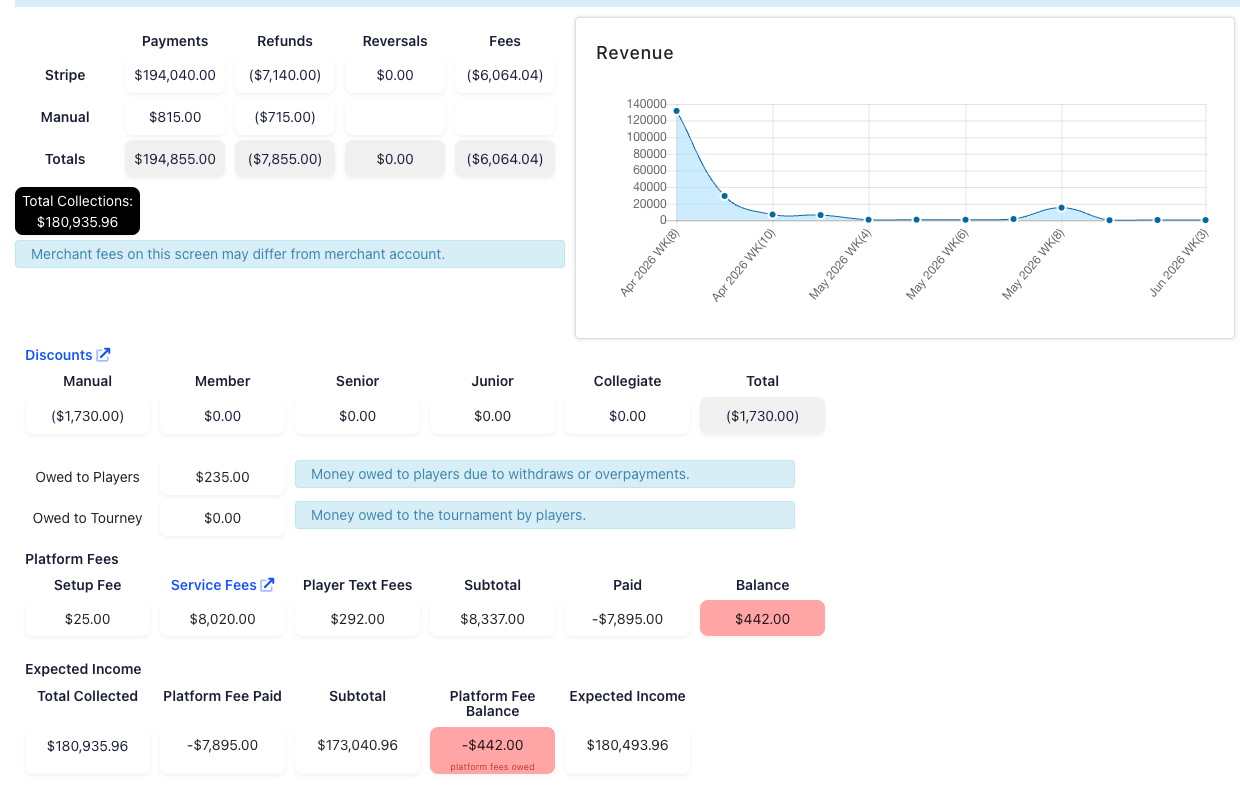
The Income section provides a real-time breakdown of all money flowing into your tournament.
| Line item | What it means |
|---|---|
| Stripe — Payments | Total amount received from players via Stripe for your tournament |
| Stripe — Refunds | Total amount you have refunded to players through PT |
| Stripe — Reversals | Amount Stripe has reversed due to a player dispute or direct request to Stripe |
| Stripe — Fees | Total processing fees charged by Stripe (typically 3–4% of payments) |
| Manual — Payments | Payments you have manually recorded for players who paid by check, cash, or another method |
| Manual — Refunds | Refunds you have manually recorded for players who received a non-Stripe refund |
| Totals | Column totals for each line |
| Total Income | Sum of all recorded income across all payment methods |
Total Income includes the service fees collected through Stripe that are paid to Pickleball Tournaments. It is gross income, not net. Subtract the Platform Fees (shown below) to determine your net revenue.
Discounts Section
This section tracks all discount types applied to player registrations.
| Discount type | What it means |
|---|---|
| Manual | Discounts applied by the tournament owner after registration via the 'Record Refund' option in the Attendees section |
| Member | Discounts applied to Club members as configured in your Registration setup |
| Senior | Discounts for players in events with Bracket Level 'Senior Amateur' (must be listed as 50+ age format) |
| Junior | Discounts for players in events listed as Bracket Level 'Junior' (player must only be in Junior events) |
| Collegiate | Discounts for players in Collegiate bracket level events (player must only be in Collegiate events) |
| Total | Sum of all discounts applied |
Money Owed to Tournament
This section shows amounts players owe but have not yet paid. Common reasons include:
- An active Pay Onsite or Pay Later checkout option is enabled
- A player paid for one event but a partner later added them to a second event
- A tournament director manually added a player and selected 'Pay Later'
The updated Total Income line at the bottom of this section carries forward the adjusted total after accounting for discounts and unpaid balances.
RecommendedOwed to Tourney and Owed to Players are driven by one net number, not two separate totals. The system totals what every player owes the tournament, totals what the tournament owes back to players (refunds or overpayments), and nets the two together — showing only the result. If more is owed to players than to the tournament, that net is negative, so Owed to Tourney displays $0.00 even though individual players still have a balance due (and vice versa). To see exactly who owes what, go to Attendees and filter With Balance: They Owe.
Platform Fees Section
This section tracks all fees owed to Pickleball Tournaments for platform use.
| Fee | What it means |
|---|---|
| Setup Fee | The one-time fee paid by the tournament owner to complete initial tournament setup |
| Service Fees | Per-player fees charged at registration. For tournaments that opened for registration on or after August 3, 2026, the Amateur Player Service Fee is $5 + 7.99% of the player's total registration checkout (Pro events: $25 per event). Tournaments that opened earlier are on the legacy plan: $5 per event, up to $10 maximum per player. Non-refundable — if a player withdraws, the service fee is still owed. Players on the waitlist are not charged until moved to a main draw event. |
| Player Text Fees | Optional per-player fee for SMS court notifications: $0.35/player for US and Canada (rates vary by country). This fee is paid by the tournament owner, not players, after the tournament completes. |
| Subtotal | Total of the three fees above |
| Paid | Amount already paid to PT — includes the setup fee and service fees collected via Stripe. Note: if a player paid manually or was marked as paid without a Stripe transaction, the service fee is still owed. |
| Balance | Remaining fees still due to PT. Player text fees are always included here. Manually recorded, discounted, or unpaid service fees also appear here. |
Income Paid
The Income Paid line shows your Total Income minus the fees paid to PT. This represents the net revenue remaining after platform fees. If a Balance is outstanding, pay that first — the Income Paid figure won't be accurate until outstanding fees are cleared.
Billing Information — Payment Method on File
Tournaments are required to have a credit card or ACH account on file. Your card on file will be automatically charged when:
- Outstanding fees exceed $250 during active registration
- The tournament locks and a balance is still owed
This most commonly occurs when players are manually added without Stripe payment, or when players are offered full discounts (where the service fee couldn't be collected at registration).
RecommendedIf you're using Stripe as your primary payment method, it's unlikely you'll trigger the $250 auto-charge threshold — player service fees are collected at registration automatically. Manual registrations and free registrations are the most common reasons a balance builds up.
User Defined Selections
This Dashboard section shows any custom purchase options you've made available to non-players attending your event. This could include tournament shirts, donations, spectator tickets, or any other goods you want to offer to people not competing. These are configured in your tournament registration setup.
Frequently Asked Questions
How are service fees calculated?
For tournaments that opened for registration on or after August 3, 2026, the Amateur Player Service Fee is $5 + 7.99% of the player's total registration checkout (base registration fee plus event fees), and Pro events are $25 per event. Tournaments that opened earlier remain on the legacy fee plan: $5 per event per player, up to a maximum of $10 per player. Service fees are non-refundable — if a player withdraws, the service fee amount is still owed. Players who register directly to the waitlist are not charged until they are moved into at least one main draw event. See Tournament Pricing for examples.
Who pays the player text messaging fees?
Player text fees are not collected from players at registration. They are charged to the tournament owner after the tournament completes, based on the number of players who received text notifications. The rate is $0.35 per player for US and Canada. Check your tournament's Edit section for rates in other countries.
When does my tournament lock?
Your tournament locks automatically 5 days after the last event day. At that point, a final invoice is generated and any outstanding balance is charged to the payment method on file.
Why does my Total Income include fees I don't keep?
The Total Income figure in the Dashboard includes service fees collected on behalf of Pickleball Tournaments. To see your true net revenue, subtract the Platform Fees section totals from Total Income, or refer to the Income Paid line once all fees are settled.
Why does Owed to Tourney show $0.00 when players still owe money in Attendees?
Owed to Tourney and Owed to Players share a single net number. The dashboard totals what all players owe the tournament, totals what the tournament owes back to players, and nets the two together, displaying only the result. When more is owed to players than to the tournament, the net is negative, so Owed to Tourney shows $0.00 even though individual players still owe money — that balance hasn't disappeared. Go to Attendees and filter With Balance: They Owe to see exactly who owes and how much.
Related Resources
- Tournament Pricing — setup fees, service fees, and full pricing details
- How and When a Tournament Is Charged — billing timeline
- How to Refund a Player Through Stripe — issuing refunds from the Dashboard
- Getting Started with PT: Complete Setup Overview — the full tournament workflow
- How to Grow Tournament Registrations with the Tournament Growth Hub
Questions about your Dashboard or billing? Reach out to our support team at support@pickleball.com — we're happy to help.