.jpg?width=1320&height=528&optimizer=image)
Manage Tournaments with the Court Desk
Streamline Your Tournament with Court Desk: Simplify Player Assignments and Scoring
Running a pickleball tournament requires balancing many moving parts at once—assigning players to courts, tracking match progress, and keeping everyone informed throughout the event. Without the right tools, tournament directors often find themselves juggling manual updates, paper scorecards, and constant player questions.
That’s where Court Desk can make a significant difference. This powerful tournament management tool helps simplify court assignments, streamline communication, and keep matches moving efficiently.
Why Tournament Management Can Be Challenging
Coordinating matches during a tournament can quickly become complicated, especially when multiple courts and events are running simultaneously.
Traditionally, tournament directors may rely on:
• Announcements over loudspeakers
• Manual text messages to players
• Printed scorecards and paper brackets
These methods can work, but they often create delays, confusion, and extra work for tournament staff. Keeping track of which players are on deck, updating match scores, and coordinating court assignments manually can slow down the entire event.
Without an efficient system in place, downtime increases and players may become unsure about where they should be or when their next match begins.
How Court Desk Solves These Challenges
Court Desk provides a streamlined solution designed specifically for tournament directors. It simplifies the process of assigning matches, notifying players, and tracking results in real time.
Automated Match Assignments
When matches are ready to begin, Court Desk allows directors to assign them to available courts with just a few clicks.
This eliminates the need for manual coordination and reduces the chance of errors when directing players to courts.
Instant Player Notifications
Once a match is assigned to a court, players receive automatic text notifications telling them exactly where to go.
This feature dramatically reduces confusion and helps keep players moving to the correct courts quickly, minimizing delays between matches.
Real-Time Score Entry
Scores can be entered directly into the system as matches are completed. This keeps the tournament bracket updated in real time and prepares upcoming matches automatically.
Real-time score entry also ensures that players, tournament staff, and spectators always have access to accurate match information.
Match Queue Management
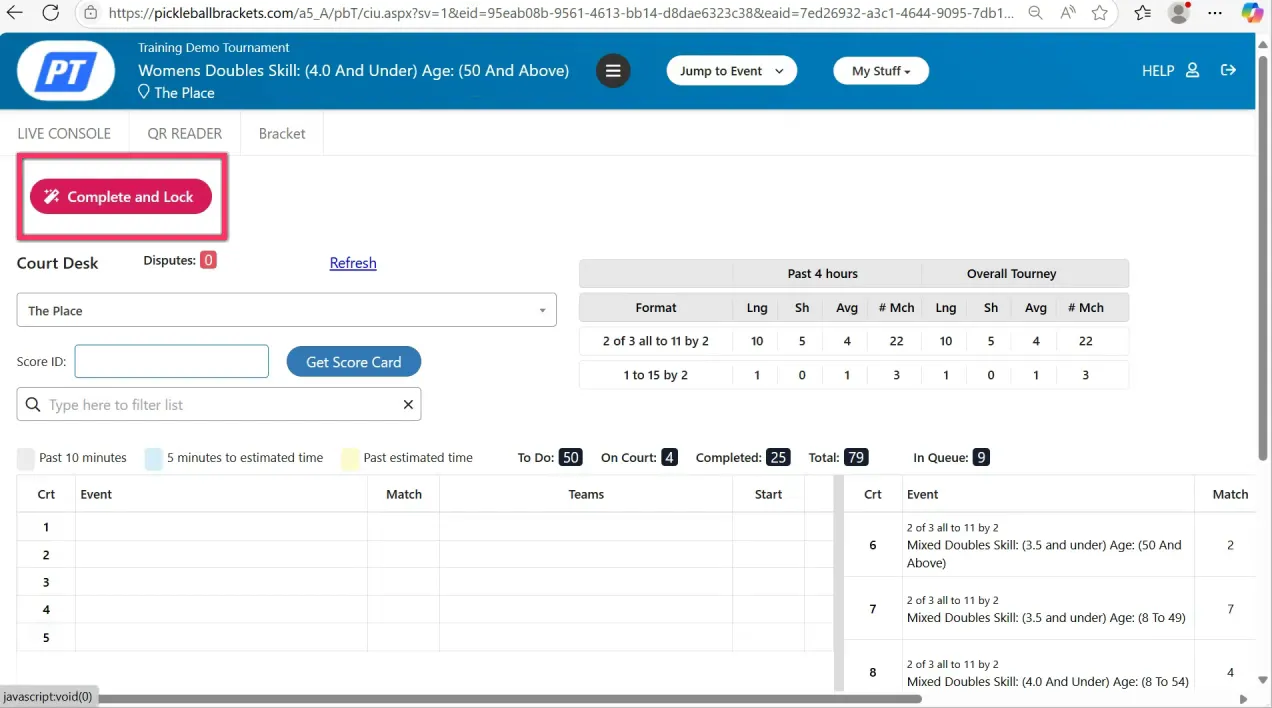
Court Desk provides a clear overview of tournament activity, including:
• Matches waiting in the queue
• Matches currently being played
• Matches that have already been completed
This visual layout allows tournament staff to stay organized and ensures no matches are overlooked.
Preparing Your Tournament for Court Desk
To use Court Desk effectively, it’s important to configure your tournament correctly before the event begins.
Enable Player Text Notifications
Automated notifications are one of Court Desk’s most valuable features. Make sure player texting is enabled so participants receive court assignments and match updates.
Without texting enabled, directors will need to rely on other communication methods.
Configure Event Settings
Your tournament events should be set up to allow the system to recognize matches that are ready to be assigned.
Ensuring proper event configuration allows Court Desk to automatically prepare the next matches in the queue.
Set Up Printing Preferences
Some tournaments prefer printed scorecards, while others rely entirely on digital score entry.
If multiple computers are used but only one printer is available, you may use a print spooler system to manage printing. Otherwise, direct printing from each workstation is often the simplest approach.
Why Court Desk Improves the Tournament Experience
Using a system like Court Desk transforms tournament operations by reducing administrative workload and improving communication.
Key benefits include:
• Faster court assignments
• Clear communication with players
• Accurate real-time score tracking
• Reduced downtime between matches
• Improved tournament organization
By automating many of the routine tasks that tournament directors normally handle manually, Court Desk allows organizers to focus more on players and overall event quality.
Supporting Complex Tournament Formats
Court Desk also works well with more advanced tournament formats, such as:
• Round robin stages followed by playoffs
• Multi-division tournaments
• Events with multiple courts and match queues
This flexibility allows tournament directors to confidently manage complex events while maintaining smooth match flow.
Ready to Improve Your Tournament Workflow?
If you want to see exactly how Court Desk works—including setup, configuration, printing options, and real-time match management—be sure to watch the full tutorial video walkthrough.
You can also explore the detailed help documentation for step-by-step guidance on getting started.
With Court Desk, you can streamline your tournament operations, improve communication with players, and run professional, efficient events from start to finish.
Related articles

In defense of pros wearing jewelry on the court
Pickleball's top athletes love to add a little extra shine.
25 days ago
-Victoria Radnothy

20 things pros wish they knew earlier in pickleball
These quick tips can help you level up your game fast.
25 days ago
-Victoria Radnothy

Must-try singles pickleball drills, straight from the pros
Take your game to the next level with practice tips from the world’s top players.
35 days ago
-Victoria Radnothy

How to build a powerful pickleball serve: Tips from the pros
Here are some simple adjustments to add pace, consistency, and control.
41 days ago
-Victoria Radnothy