How to connect your Pickleball.com profile to DUPR

How to connect your Pickleball.com profile to DUPR

  • How Do You Connect Your Pickleball.com Profile With DUPR?

    You can connect your Pickleball.com profile with your DUPR rating directly from your account settings. This integration allows tournament results to sync automatically between platforms, helping players track performance more accurately while enabling tournament directors to place competitors in the correct divisions.


    What Is the Pickleball.com and DUPR Integration?

    The Pickleball.com and DUPR integration links your player profile with the Dynamic Universal Pickleball Rating (DUPR) system.

    This connection allows:

    • Your tournament results to update your DUPR rating
    • Your rating to appear within your Pickleball.com profile
    • Tournament directors to use accurate player ratings for event placement

    By connecting the two platforms, players gain a clearer picture of their competitive progress while events maintain consistent rating standards.


    How Does the Pickleball.com and DUPR Integration Work?

    Once your accounts are connected, results from events and tournaments automatically sync between platforms.

    This means:

    • Events played in PickleballBrackets update your DUPR rating
    • DUPR-rated matches update your Pickleball.com player profile
    • Tournament organizers can rely on a consistent rating system

    This integration helps streamline tournament management while improving rating accuracy for players.


    Why Is DUPR Becoming the Default Rating System?

    DUPR is being adopted as the primary rating system for many tournaments because it provides a unified method for evaluating player skill.

    Key updates include:

    DUPR will become the default rating system for most new tournaments
    • Exceptions may apply for organizations such as Pickleball Canada and USSP Senior ratings
    • All tournament results will be reported to DUPR regardless of rating system used

    This shift helps standardize ratings across events and ensures consistent competitive placement.


    What Happens to PBR/WPR Ratings?

    As the transition to DUPR continues, previous rating systems are being phased out.

    Important changes include:

    PBR/WPR will no longer be offered for new tournaments
    • Existing tournaments that are already open for registration may continue using them
    • A “Convert to DUPR” option is being developed for tournaments transitioning systems

    During this transition period, support for PBR/WPR adjustments will remain available but will gradually decrease as more events adopt DUPR.


    How Do You Connect Your Pickleball.com Account to DUPR?

    You can link your accounts directly from your Pickleball.com profile settings.

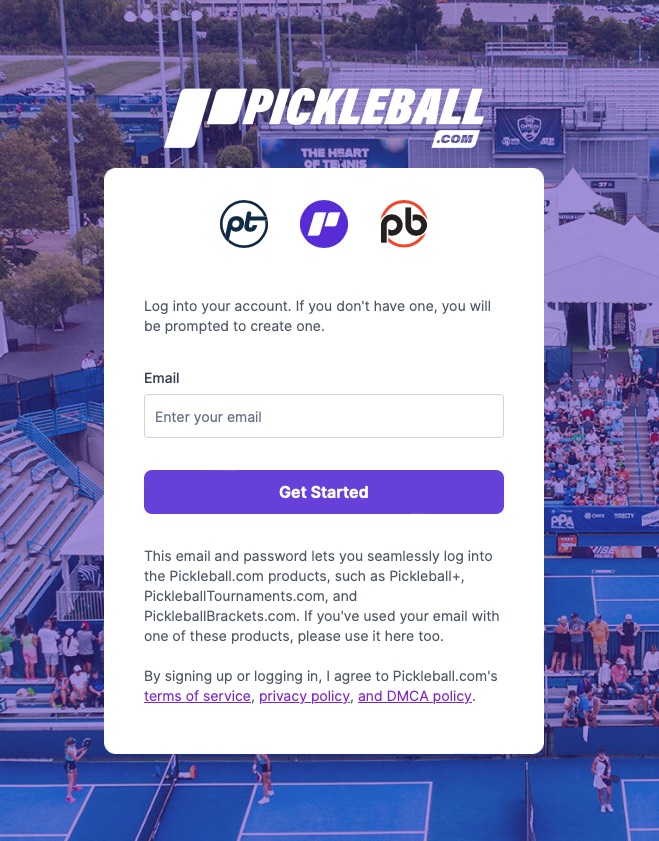
    Step 1: Log In to Pickleball.com

    Go to Pickleball.com and sign in to your account.


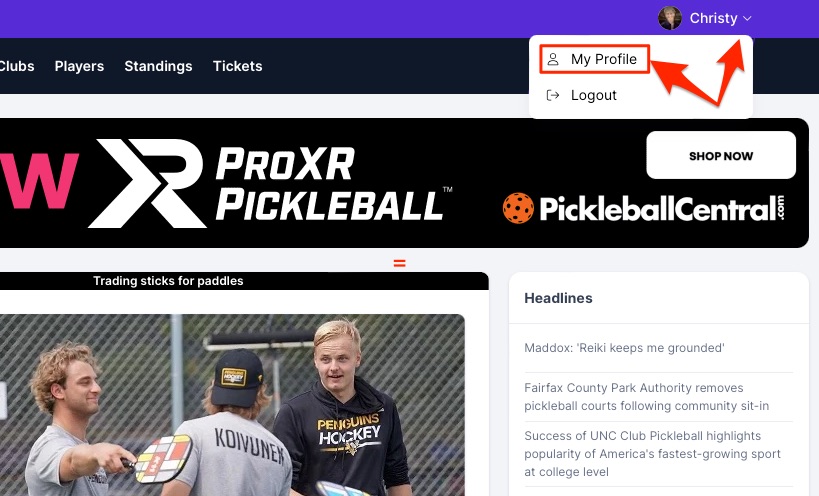
Step 2: Open Your Profile

Once logged in:

• Click your profile icon in the upper-right corner
• Select My Profile

This opens your player profile dashboard.


Step 3: Click Edit Profile

Within your profile dashboard:

• Click the Edit Profile button

This allows you to update personal settings and connect external accounts.


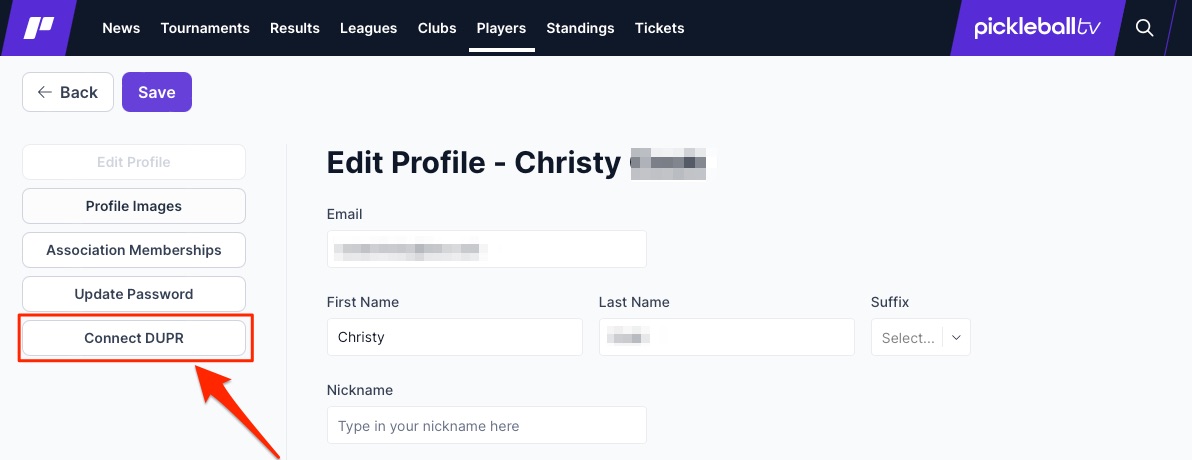
Step 4: Select Connect DUPR

Inside the profile editor:

• Click the Connect DUPR button

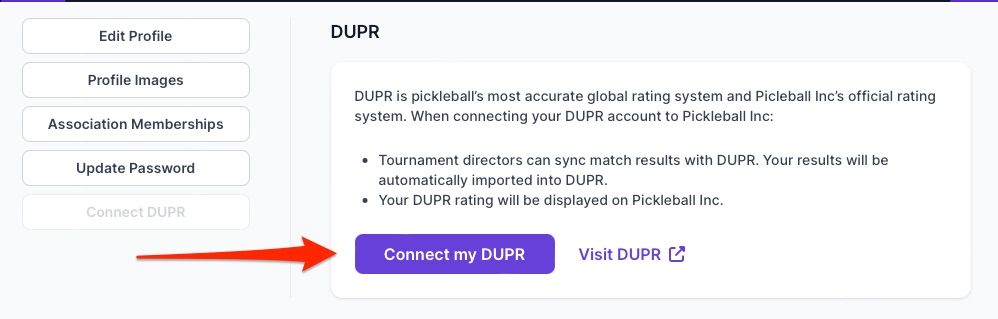
Step 5: Confirm the Connection

Click Connect my DUPR to begin the linking process.

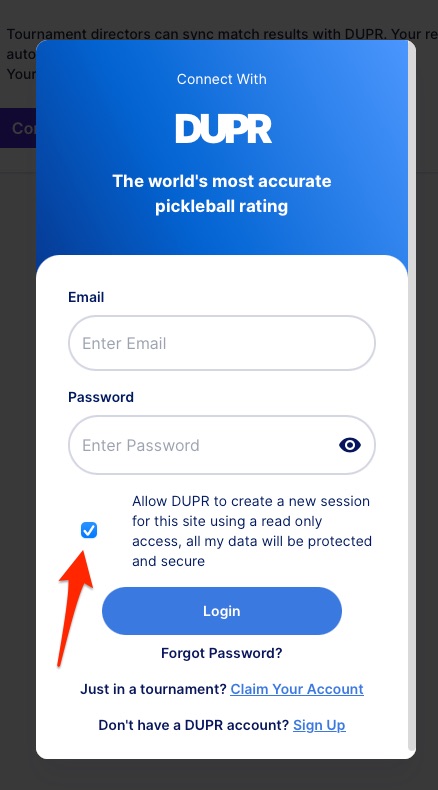
Step 6: Log In to Your DUPR Account

A new window will open prompting you to log in to your DUPR account.

Enter your DUPR credentials and click Login.

Be sure to select the option:

“Allow DUPR to create a new session…”

This permission allows the systems to communicate and sync ratings.


Step 7: Confirm Integration

Once the login process is complete, your accounts will be connected.

After integration:

• Events played through PickleballBrackets update your DUPR rating
• DUPR-rated events update your Pickleball.com player profile rating

Your rating data will now stay synchronized between both platforms.

Why Should Players Connect Their Accounts?

Linking Pickleball.com and DUPR provides several benefits for players and organizers.

Benefit #1: Accurate skill tracking
Players can monitor how tournament results affect their rating in real time.

Benefit #2: Better tournament placement
Directors can place players in the correct divisions based on reliable ratings.

Benefit #3: Simplified competitive experience
Match results automatically update across both platforms without manual entry.


Common Questions About DUPR Integration

Do I need a DUPR account to connect?

Yes. You must have an existing DUPR account in order to connect it to your Pickleball.com profile.

Will all tournaments use DUPR now?

Most new tournaments will use DUPR as the default rating system, though some organizations may still use alternative systems temporarily.

Will my old match results still count?

Yes. Tournament results will continue to be reported to DUPR, ensuring that your rating reflects your full playing history.

Can I disconnect my DUPR account later?

Account management settings may allow adjustments, but the integration is designed to maintain consistent rating data across platforms.


Key Takeaways

• Pickleball.com profiles can now be connected directly with DUPR ratings.
• Tournament results automatically sync between both platforms.
• DUPR is becoming the default rating system for most new tournaments.
• Older rating systems like PBR/WPR are gradually being phased out.
• Linking accounts improves rating accuracy and tournament placement.


Want to Learn More About DUPR?

For more details about how the rating system works, visit the DUPR website to explore rating calculations, match reporting, and competitive play guidelines.