.jpg?width=1320&height=528&optimizer=image)
How to Create a Pickleball.com Profile for a Minor
Creating a Pickleball.com profile for a minor is a guardian-led signup flow that lets parents manage registrations, consent forms, privacy settings, and ratings from one place. You’ll sign up using a dedicated “child under 17” option, authenticate with your guardian account, enter your child’s details, sign the required media release and consent form, and verify the child’s email using a six-digit code.
What Is a Pickleball.com Minor Account?
A Pickleball.com minor account is a child’s player profile that is created and managed under a parent or guardian’s oversight. The platform is designed to keep minors safe while still allowing them to participate in events, lessons, tournaments, and rated play.
A minor account allows a parent or guardian to:
• Register the child for events, lessons, and tournaments
• Manage privacy and media release settings through a guardian-managed flow
• Maintain accurate contact and rating information tied to the child (including a DUPR rating, if created)
• Keep parental oversight while enabling participation in the pickleball community
Pickleball.com’s rollout is phased. Phase One focuses on enabling parents and guardians to create and manage minor accounts. Future phases are expected to add additional conveniences like releasing accounts to managers and consolidating existing minor accounts under a guardian profile.
How Does Creating a Minor Account Work?
The creation process is straightforward and follows a guardian-first workflow that includes consent and verification steps.
Step 1: Prepare What You’ll Need Before You Start
Before you begin, gather the following:
• A parent or guardian Pickleball.com account (you’ll log in during the flow)
• A unique email address for the child (required for verification)
• Basic child details (name, phone number, skill level, time zone)
• Willingness to review and digitally sign the media release and consent form as the guardian
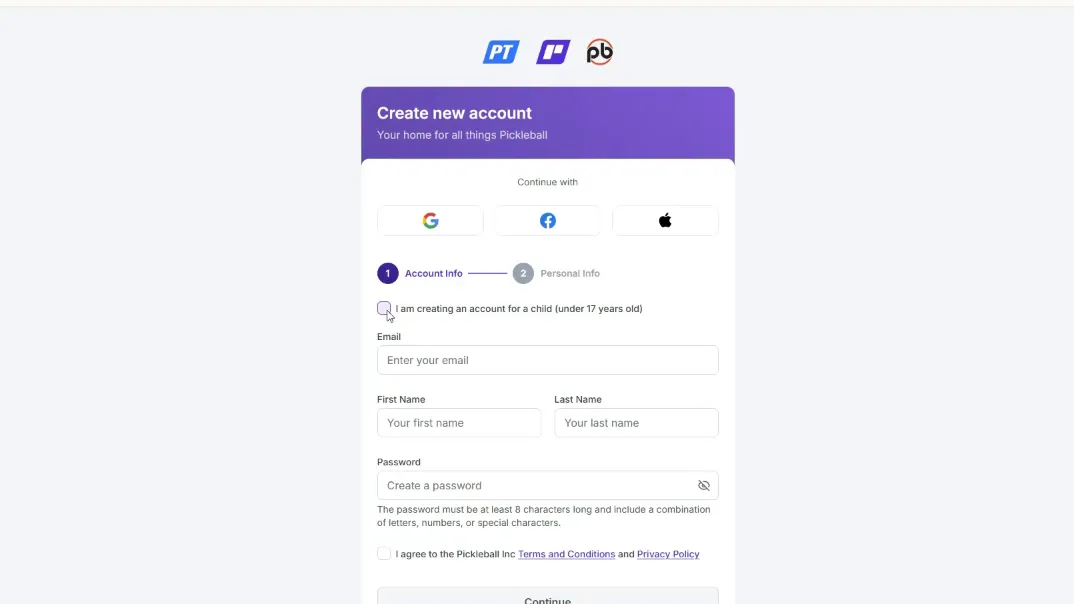
Step 2: Start the Signup Flow for a Child Under 17
• Go to Pickleball.com and click Sign Up
• On the registration page, select the option for creating an account for a child under 17
This is a dedicated path specifically designed for minor account creation.
Step 3: Log In as the Parent or Guardian
• The system will prompt you to authenticate using your guardian account
• This verifies you are authorized to create and manage the child’s profile
Guardian authentication is a core safety step that keeps parental controls front and center.
Step 4: Enter the Child’s Email and Create a Password
• Enter the child’s email address
• Create a secure password you can help them remember
• Accept the platform’s Terms of Service on the child’s behalf
A unique email is required because the platform will send a verification code to that inbox.
Step 5: Complete Personal Details and Contact Preferences
• Add the child’s phone number if available
• If the child does not have a phone, you may use the parent or guardian phone number instead
• Review any checkbox options carefully (marketing preferences, contact consent, etc.) and select what’s appropriate
Keeping contact information accurate matters for notifications, event updates, and registration communication.
Step 6: Select Skill Level and Time Zone
• Choose the child’s approximate skill level
• Select the correct time zone so event times and local content display properly
This prevents scheduling confusion and ensures accurate event timing.
Step 7: Decide Whether to Create a DUPR Account
During signup, you’ll be asked whether to create a new DUPR (Dynamic Universal Pickleball Rating) account for the child.
Creating a DUPR account is helpful if your child will participate in rated events or tournaments because it:
• Simplifies future registrations
• Supports accurate matchups and rankings
• Ensures the child’s competitive history is tied to the correct profile
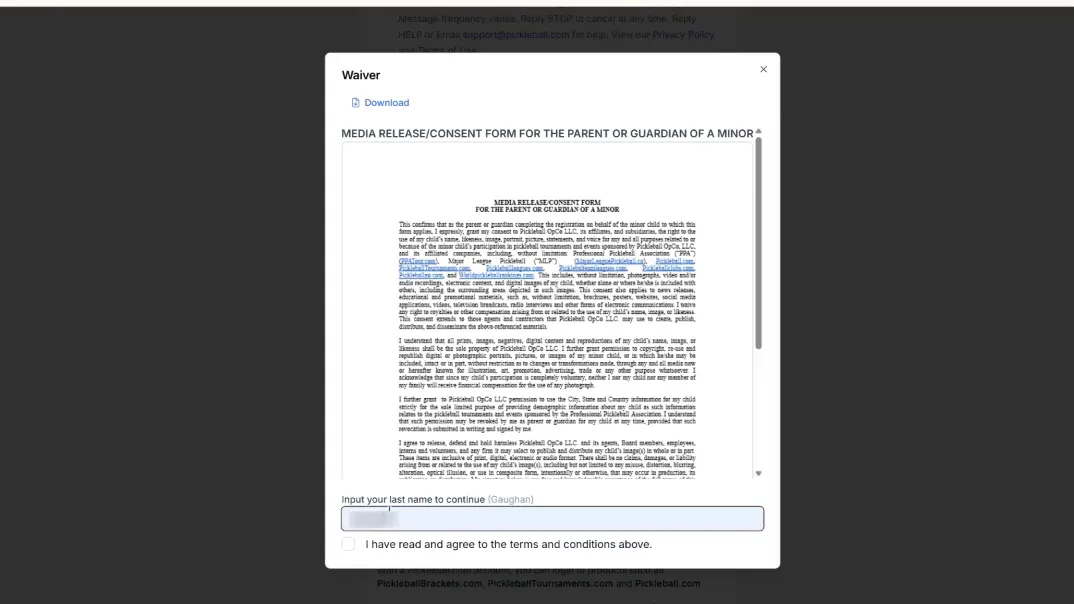
Step 8: Review and Sign the Media Release and Consent Form (Guardian Step)
Because this is a minor account, the platform requires guardian consent.
To complete this step:
• Check the box to view and sign the media release and consent form
• Read the full text carefully to understand how media, photos, and personal data may be used
• Type your last name in the signature field
• Check the confirmation box that you’ve read the terms and conditions
• Return to the account creation screen and click Create Account to finalize
This is a standard safety and legal requirement designed to ensure minors’ images and personal information are handled with guardian permission.
Step 9: Verify the Child’s Email Address
After the account is created, the child’s email receives a six-digit verification code.
To finalize:
• Open the child’s email inbox and locate the verification message
• Enter the six-digit code in the verification field on Pickleball.com
• Click Verify and Create Account
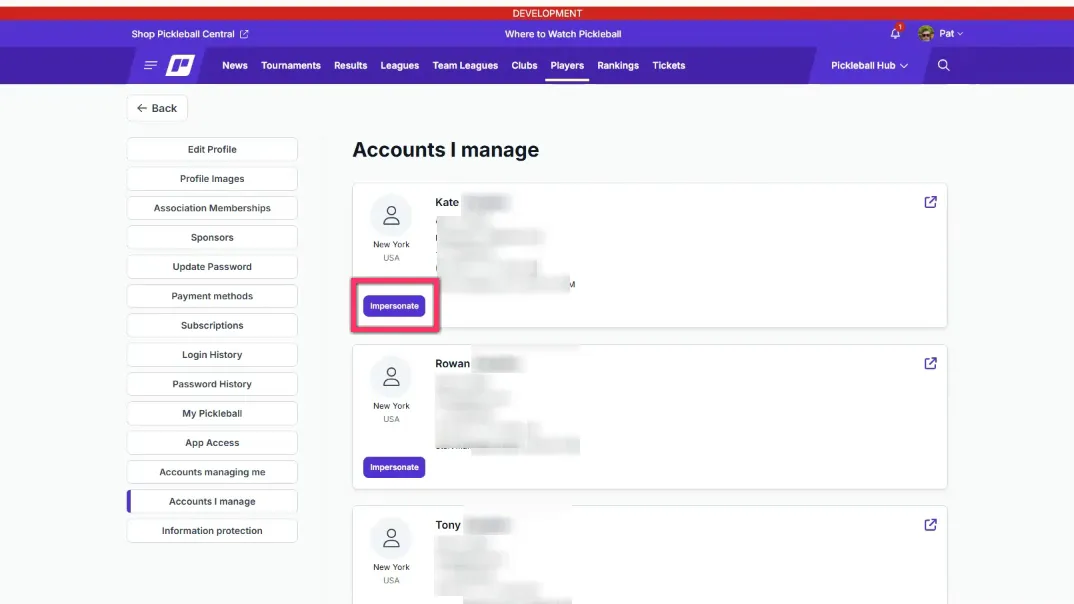
Once verified, the minor account will appear under your profile in Accounts I Manage.
Why Is Creating a Minor Account Important?
A dedicated minor account keeps youth participation organized, safe, and properly attributed to the correct player.
It matters because it:
• Enables event and tournament registration under guardian oversight
• Centralizes consent, privacy, and communication settings
• Keeps ratings and match history tied specifically to the child (especially if using DUPR)
• Reduces confusion when multiple family members participate on the platform
It also prepares families for the broader Pickleball.com roadmap, as future phases are expected to introduce more advanced management features for youth accounts.
What Are the Key Benefits of the Guardian-Managed Flow?
Benefit #1: Safety and oversight
Guardian login and consent ensure minors participate with parental controls.
Benefit #2: Clean organization for events and ratings
Accurate contact and rating data stays attached to the child’s profile, including DUPR if created.
Benefit #3: Simplified management with impersonation
Parents can manage registrations and updates without logging out or juggling multiple passwords.
Common Questions About Creating a Minor Pickleball.com Profile
Do minors need their own email address?
Yes. The signup requires a unique email address so the child can receive the six-digit verification code. If your child doesn’t have an email, you can create a simple monitored address dedicated to youth activities.
What is DUPR and why does it matter?
DUPR stands for Dynamic Universal Pickleball Rating. It is widely used for competitive play. Creating a DUPR account during signup ensures your child’s matches and tournament entries are tracked correctly and matched appropriately by skill.
Can I register my child for events without switching accounts?
Yes. The platform includes an impersonation feature for accounts under your management, allowing you to perform actions as the child without logging out.
Can I unregister or delete a child’s account later?
Account management tools typically include options for deactivating or removing accounts, but policies vary. Check the platform’s help resources or contact support if you need full account removal or transfer.
What if I don’t receive the verification email?
• Check spam/junk folders
• Confirm the email was entered correctly
• Resend the verification from the account creation screen
Managing the Account Using the Impersonation Feature
Pickleball.com provides an Impersonate button for guardian-managed minor accounts.
Why this is useful:
• Register the child for camps, lessons, or tournaments from your dashboard
• Avoid remembering multiple passwords or switching accounts
• Keep guardian oversight recorded in the system
How to impersonate:
• Go to Accounts I Manage
• Find the child’s profile
• Click Impersonate
• Complete registrations or profile updates as needed
• Exit impersonation to return to your guardian account
Practical Tips and Best Practices
• Create a dedicated email for each child to simplify verification and reduce confusion
• Store guardian login details in a secure password manager
• Decide on DUPR early if competitive play is likely
• Keep phone numbers current (use a parent number if the child doesn’t have one)
• Review media release and consent language closely before signing
What’s Next in Future Releases?
This guide reflects Phase One of the current rollout. Pickleball.com has indicated future updates may include:
• An option for players to release their accounts to a manager (useful for coaches or program administrators)
• The ability to consolidate an existing minor account under a parent or guardian account
• Enhanced management tools for multiple minors and advanced privacy settings
These changes aim to reduce administrative overhead for parents and simplify youth player management for clubs and coaches.
Key Takeaways
• Minor accounts are created through a dedicated “child under 17” signup flow
• A parent/guardian account is required to authorize and manage the child profile
• Each minor account requires a unique email for verification
• Guardians must sign the media release and consent form during setup
• The impersonation feature makes registrations and updates easy without account switching
Want a Visual Walkthrough?
If you want a visual walkthrough or prefer to follow along in real time, you can learn more by watching the training video below. It demonstrates each screen and click so you can follow step-by-step while you create your child’s account.
.png?width=592&height=237&optimizer=image)